 RaveReply
Your Google reviews, handled. While you're on the job.
RaveReply drafts a reply to every review for your HVAC, plumbing, electrical, or roofing shop — any trade, in your own voice. You just tap approve.
✓ Manual approval by default. Automatic sending only if you opt in.

A dead reviews section costs you the next call.
Reviews aren't vanity — they're how customers find you and decide whether to dial your number instead of the shop down the road. RaveReply keeps them answered without adding one more thing to your day.
Show customers you're listening
Helpful replies show customers that you value their feedback. Google doesn't identify reply activity as a local ranking factor, and RaveReply doesn't promise a ranking boost.
They read your replies
Before anyone calls, they scroll your reviews and how you handled them. A sharp reply to a hard review sells better than any ad.
Off your plate
No more writing replies at 11pm — or forgetting to. Rev drafts them; you tap approve from the truck between jobs.
No dashboards to learn. Just your reviews, answered.
Connect your Google listing
One secure sign-in through Zernio, our Google Business Profile integration provider. Review replies wait for approval unless you enable an automatic-sending lane.
Tell Rev your voice
Paste a few replies you've written, or pick a tone. Rev learns how your shop sounds — and gets sharper with every edit.
Approve in one tap
A review comes in, Rev drafts the reply, you tap approve from your phone. Done.
Let Rev send the 5-stars on autopilot.
Flip on 5-star auto-send and Rev posts your thank-yous without a tap. Other eligible lanes, including 4-star replies and timed holds for lower ratings, require separate opt-in in Settings. Every lane is off by default; lower-rated replies flagged as sensitive stay in the manual queue.
Generic AI writes generic replies. Rev writes yours.
A free tool spits out the same stiff "Thank you for your feedback!" every shop gets. Rev learns from the replies you've written and every word you change, so drafts land in your voice — and they're ready the moment a review shows up, not when you finally remember to log in.
"Thank you for your feedback. We appreciate your business and hope to serve you again!"
"Appreciate you, Dave — glad we got the furnace back up before the cold snap. Call the shop anytime, and tell Karen we said hey."
Your voice, on file — for good.
Every reply you approve or tweak teaches Rev a little more. The longer you use it, the more the drafts sound like they came straight from your shop — because they did.
The easy ones and the brutal ones — both sound like you.
"On time, fixed the AC same day, cleaned up after. Fair price. Highly recommend."
 Rev's draft — ready for your okay
Thanks so much — that means a lot. Glad we could get you cool again same day. We're here whenever you need us, and we appreciate the recommendation.
"Charged me double the quote and left a mess. Won't use again."
Rev's draft — ready for your okayI hear you, and that's not the experience we want anyone to have. I'd like to look into the quote and the cleanup personally — please give me a call directly at (555) 012-3456 so I can make it right.
Don’t just answer reviews — get more of them.
Most shops have a stack of happy customers who never left a review. Ask every one of them in a couple of taps — a text, an email, or a QR code for the truck and the front counter — and watch your rating climb. Rev answers each new review as it lands.

Ask in a tap
Send a friendly review request by text or email, or print a QR code for the invoice and the front desk.
Reviews roll in
Customers leave the review they always meant to. You ask everyone, not just the happy ones — the honest way Google and the FTC require.
Rev handles the replies
Every new review gets a reply in your voice, so your profile stays active and the next customer sees you show up.
See exactly where your town finds you.
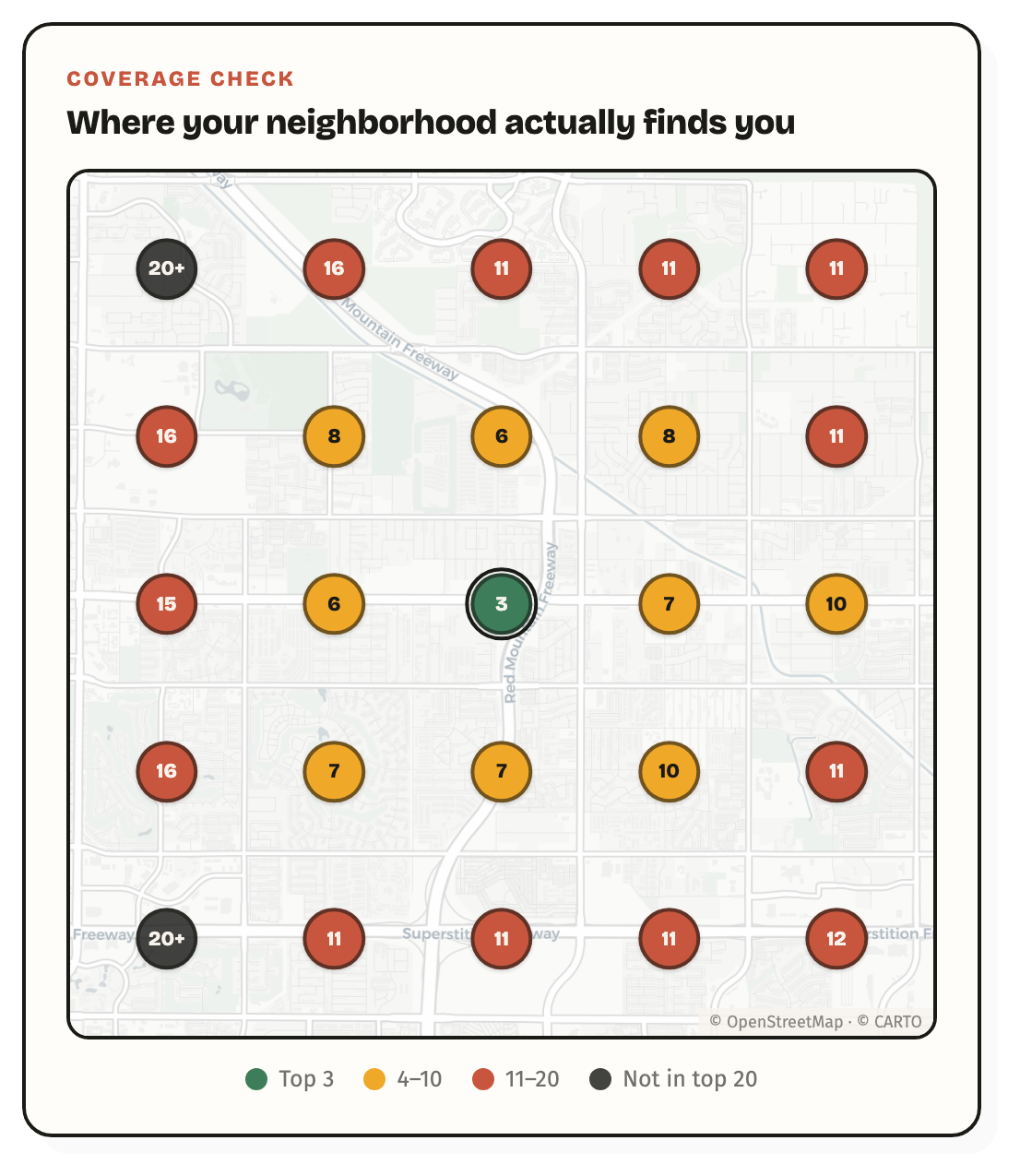
The free scan maps your Google ranking across 25 spots in your service area — the green dots are where you win the call, the red and dark ones are where it goes to someone else. Same scan checks whether ChatGPT recommends you when a customer asks who to call.
Run the free scan →Real Google data. No signup, no credit card, no email.
Nothing goes out with your name on it unless you say so.
Manual approval by default
Read, edit, or skip drafts in your manual queue. Automatic sending requires a separate opt-in for each eligible lane.
Auto-send is off by default
Start with optional 5-star thank-yous. You choose any additional eligible lanes in Settings and can pause automation.
No fake reviews, ever
RaveReply replies to real reviews. It never writes reviews or games your rating.
Cancel anytime
Month to month. No annual contract, no salesperson, no "call to cancel."
Help local customers find your business and choose you.
Managed Google local advertising plus RaveReply review management. One team, one payment, and clear reporting on inquiries, bookings and actual ad spend. We check eligibility before a paid launch; your team still answers calls and books jobs.
Get more leads →Applications are open for pilot review. Pricing is quoted separately from our software-only plans.
Start with Pro. Add more when you need it.
- Every review answered in your voice
- Your backlog of old reviews, too
- Approve from your phone in one tap
- The hard 1-stars, handled with class
- No setup fees — ever
First trial: 14 days free, then Pro renews at $24/month (USD). Cancel before the trial ends to avoid renewal. Returning users who already used their trial pay from day one. No setup fees; cancel in-app.
Need Google posts, photos, and holiday hours too? Storefront is $39/month for one location. For multiple locations, Crew is $19/location/month with a three-location minimum ($57/month). Choose your plan before checkout; availability and any discounts or applicable taxes are shown there.
The stuff you're probably wondering.
How do I stay in control of AI replies?
Manual approval is the default: read and edit each draft before sending. If you deliberately enable an automatic-sending lane, replies in that lane can post without another approval. You're responsible for the replies posted under your name and for following Google's policies. Pause automation in Settings whenever you want.
What about the reviews I already have?
Rev drafts replies for your existing unanswered reviews too, not just new ones — so you can catch up on the backlog in an afternoon.
Won't it sound like a robot?
No. Rev learns from replies you've written and every edit you make, so drafts sound like your shop — not a call center. And you can change any word before it posts.
Do I need to install anything?
Nope. RaveReply runs in your browser and works great on your phone. Add it to your home screen and approve replies between jobs.
Can I cancel?
Anytime, yourself, in a couple of clicks. Month to month — no annual lock-in.
Handle reviews for a roster of local businesses?
RaveReply Crew puts every authorized client’s reviews in one queue — one login, each reply drafted in that client’s own voice, $19 per location a month (three-location minimum: $57/month). No membership fee or setup fee. See the agency page for how client management works.
Ready when you are.
Connect your Google listing and watch Rev draft your first replies — free. Start posting whenever you're ready.
Start free →